Vessum › Blog › How to turn Face ID off in two seconds
How to turn Face ID off in two seconds
Press and hold the side button and either volume button. Your iPhone will then refuse your face and ask for the passcode. Why that one gesture matters, and the four other ways it happens on its own.
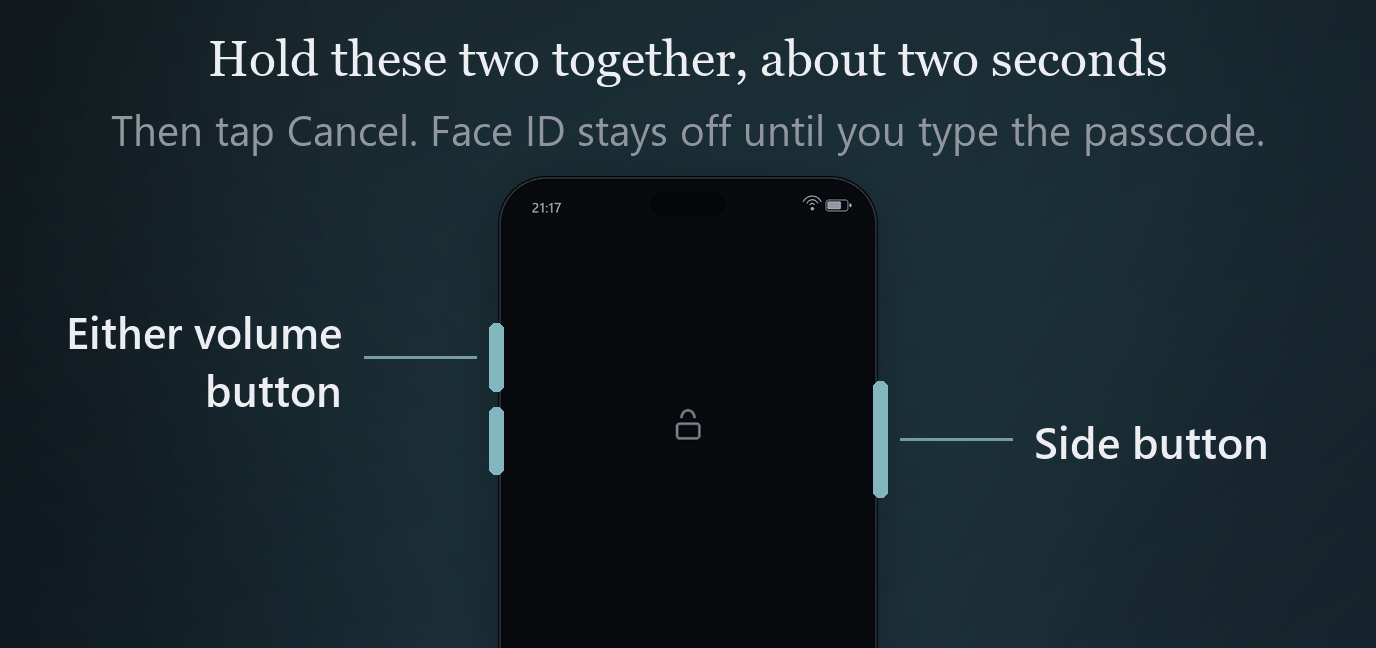
Press and hold the side button and either volume button, together, for about two seconds. The power off screen appears. Tap Cancel.
Your iPhone will now refuse Face ID and open only with your passcode, until you type that passcode once.
That is the whole thing. It takes less time than reading this sentence, it works with the phone in your hand or in your pocket, and it is the single most useful gesture on the device that almost nobody knows.
Why it is worth knowing
Face ID is a convenience that turns into a liability at one specific moment: when the phone and your face are in the same place and you are not the one deciding.
A passcode is something you know. Getting it out of you requires your cooperation, or something close enough to it that everyone present understands what is happening. A face is something you are. It can be used while you hold still, while you sleep, while somebody holds the phone up in front of you. It takes a second and it needs nothing from you at all.
The gesture above closes that gap. It does not hide anything and it does not lock anybody out. It moves the phone from "can be opened by pointing it at you" to "can only be opened if you decide to type something", which is a different conversation entirely.
There is a legal dimension, and it varies
In several jurisdictions, compelling someone to reveal a passcode has been treated differently from compelling them to present a face or a finger, on the reasoning that saying what you know is not the same as being shown. Courts have not landed in the same place everywhere, and some have gone the other way entirely.
What matters here is only this: the distinction exists, it is recognised in law in some places, and it points the same direction as the practical argument. Nothing on this page is legal advice, and the rules where you live may be different from the rules where you are travelling.
The four other ways it happens on its own
The gesture is the deliberate version. Your phone also falls back to passcode only, with no input from you, in these situations.
| When | Why it matters |
|---|---|
| After a restart, before the first unlock | The strongest state the phone has. Most of its data has never been decrypted into memory |
| After 48 hours without an unlock | A phone that has been sitting in a drawer or an evidence bag hardens by itself |
| After five failed Face ID attempts | Being pointed at the wrong face repeatedly ends the attempt |
| After a remote lock from Find My | From any browser, on anybody's device |
Recent iOS versions also restart the phone by themselves after roughly three days without being unlocked, which returns it to the first state in that table automatically. That matters most when a device is held for a while, and we wrote about it in crossing a border with your phone.
If you have time to plan, power the phone off completely. Off is stronger than passcode only, for the reason in the first row of that table. The two second gesture is for when you do not have time to plan.
Check one setting while you are here
Settings, then Face ID and Passcode, then Require Attention for Face ID.
With it on, Face ID will not unlock unless your eyes are open and looking at the screen. With it off, a face that is turned towards the phone is enough, whether or not the person behind it is awake, willing, or paying attention.
It is on by default for most people, but not for everybody, and it is the difference between a biometric that needs you present and one that needs only your head. Take the ten seconds to confirm it.
Practise it until you do not have to look
This is a muscle memory thing, not a knowledge thing. Knowing the gesture exists is worth very little at the moment you need it, because that moment is short and you will not be calm.
Do it five times today. Then do it with the phone in a pocket or a bag, without looking, which is how you are most likely to need it. It should take you one attempt, not three.
What this does not do
Three honest limits, in the order people get them wrong.
It does not hide anything. Everything on the phone is still on the phone, in the same places. This changes who can open it, not what is there.
It does nothing if they already have your passcode. The gesture forces a passcode prompt. If the passcode is known, you have forced a prompt that somebody can answer. What helps in that situation is deciding in advance what the passcode you give actually opens, which is the subject of when somebody demands your passcode.
It is not a defence against forensic extraction. It changes the state the device is in, which genuinely matters to the equipment, but a phone taken away and examined is a different problem with a different answer, and that answer is mostly about not carrying the data.
The short version
- Side button and either volume button, held together, about two seconds.
- Tap Cancel. Face ID is now off until you type the passcode.
- If you have more warning than that, power the phone off instead.
- Check Require Attention for Face ID is on.
- Practise the gesture in a pocket until it takes one attempt.
Face ID is not the problem. Face ID being available at the wrong moment is the problem, and that is a two second fix you already have.
Vessum
Photographs, documents and notes behind more than one passcode. Each one opens a different space, and none of them can prove the others exist.
Download on the App Store